

BACKGROUND:
The band has disbanded, no more fun nights entertaining the punters ... upwards and onwards to other musical ventures.
This tight little package was used to provide backing for a small band doing the club venue circuit but they have now "moved on" and have no need for this gear any longer. My task is to find another muso who can make use of such a handy little box of tricks!
I normally do not offer "other people's items" but as a favour to the band, I will see if anyone wants this unit (on the bands behalf)
I estimate this equipment to be around 15 years old, it is no longer supported by M-Live although I have found a number of websites with various bits & pieces of software, guides and hints n tips.
In the world of digitally based musical equipment, this is ANCIENT ... 15 years is a long, long time in the digital world.
This does present some software issues and after spending quite a bit of time investigating this equipment, I have detailed the information I have gleaned during my 'discovery' ...
If you need to have some backing material while performing, this could be just what you need. It reads MP3, standard MIDI, MF3, and M-Live's proprietary 32-track MF5 formats. But wait! there's more ... it can also play MP3 Karaoke files, which feature synchronized scrolling lyrics and chords.
The "box" features a powerful MIDI expander with polyphony of up to 124 notes and features hundreds of studio-quality acoustic, drum, and synth sounds.
Onboard micro-mixer with dedicated equalizers, echo, and reverb for your vocals but no Auto-Tune! If the artist cannot sing, this box will not help out ...
The user can also create custom playlists, edit MIDI files and sound parameters in real-time, and store thousands of songs on Compact Flash cards.
Finally, the box has video output for Karaoke situations and also is accessible via a PC*
*A lot more about this PC access down below, it is vital to read that information
After that introduction, let's get down and dirty with some info about this equipment
First up ... I have a found a link online to the User Manual ... read this to judge the capabilities of the OKYWEB 3 and it's suitability for your situation.
Also, here is a "marketing video" which may provide some insights of how it may help you out at your next gig as well
M-LIVE OKYWEB 3 - Midi & MP3 Backing Track Player Plus Vocal Processing
Designed & manufactured in Italy
Released to the musician's marketplace around 2010 (!)
Made obsolescent by the release of the OKYWEB 4, which in turn was also made obsolescent (it's like Apple phones, you are always needing to upgrade, upgrade)
INCLUDED ITEMS:
OKYWEB 3 Main Unit
Power plug pack to suit
Bracket assembly for use with the OKYSTAND (Yes, you guessed it, a music stand!)
The boys did not give me everything though ...
NO user manual but I have found that this manual is readily available online for downloading, I have provided a link above for this purpose.
NO sample files supplied
NO CF Card supplied
NO Multiport lead - as it turns out, this is VERY important and a MUST HAVE (in my opinion)
I do have the video out cable (SCART TV input!) but it is offered separately to this advertisement as many will probably not want to use this AV cable, being of more use for Karaoke setups and it is afterall, a SCART connection to the TV/Monitor HERE
COSMETIC CONDITION:
Before getting into the nitty gritty on the technical side of things, just to let you know that ...
The unit is clean
NO damage to the outer case, control buttons, LCD screen, input or output ports and knobs - very nice condition
All labelling is clear (unworn) and easy to read
The OZYSTAND bracket is also in very good condition and comes with the two thumb nuts for securing to the OZYWEB 3 unit
The Australian standard power pack is undamaged, as is the output lead and plug
OBSERVATIONS & TESTING
This section is crucial to understanding what you are 'in for' if considering this quite dated equipment - yes it works but .... quite frankly I see a lot of folks offering this exact unit at prices which I think are in the twilight zone! People need to be realistic, these are not hard to find in the marketplace and the technology is old in digital terms. I have priced this unit based on my instructions from the band and philosophy of offering items at a 'fair and reasonable' price with the primary consideration being how much time I have spent investigating this unit (quite a bit of time as it turns out) To be frank, I would be paying US$449 for this unit - that is a typical asking price for these on Fleabay.
Keep in mind that with all the 'weaknesses' I am about to point out, this unit was functioning fine for 'the band' (they were a live act doing the club circuit - bit of backing music, vocalist and additional instruments) For them (non-techie's) this box did the trick and they never changed the software in particular. I just want folks to realise that this old gear can be a challenge to update ...
First point ... this OKYWEB 3 is running Version 1.14 (!) firmware now that's old and likely to be 'buggy' as most early software releases are. The latest Version firmware (software) was 2.11 prior to the product being discontinued and the OKYWEB 4 stepped into the market.
Updating the firmware is (apparently) an easy process which progressed automatically but ONLY when the Multiport ~ USB cable was connected to a PC. I was not provided with this cable and it turns out that it is pretty important in the scheme of things. Primarily this cable allows for a local PC to 'talk' to the OKYWEB 3 and do things such as firmware upgrades and organise the music files, download new files etc
The cable required is dated but I can see they are still on offer online (around A$20 seems to be the going rate) - basically it is an 8 pin (2x 3pins row plus a 1x 2 pin row) male Mini DIN connector (see the photograph below), with the old USB type A at the other end (going to the PC). As long as the PC has Internet access, you are ready to go!

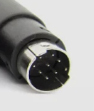
So, the first step is to obtain one of these Multi port leads, I am NOT providing one.
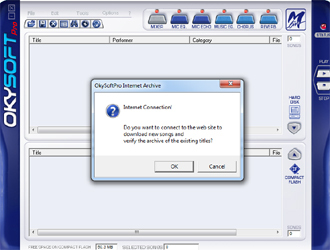
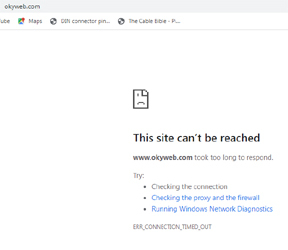
Next, the PC software, which is called OKYSOFT or OKYSOFT PRO - this software is NOT provided (once again) but I found it not difficult to locate and download. I ran the OKYSOFT PRO Version 2.2 and then hit another snag ... compatibility issues with my test machine which is running Win 7. I appears this software is looking for earlier Windoze versions such as XP. I tried compatibility mode but this really didn't help except the software did try to connect to www.okyweb.com but then the connection kept timing out - this does not appear to be a live domain any longer ... drat! So I gave up on the OKYWEB PRO software. I did notice multiple sites with this software available but some messing around is probably going to be required to get this software working and it is likely to later Windoze version will just 'spit the dummy'
Just some of the useful links I found during my investigations were ...
https://www.m-live.com/okyweb3-2-3/
https://www.midi.com.au/support/downloads/manual_okyweb_3.pdf
https://www.midi.com.au/merish-okyweb-support
If you have the time (which I do not!) further research will reveal many more sites and forums talking about this unit
Now let's move onto the hardware, confirming as best I can with the limited time I have allocated to this unit ...
Powers up fine ...
It does a short self test and then proudly displays the version number (1.14). At this point if no CF card is inserted, it tells you.
If a CF card is inserted, it reads it and shows either the contents or that something is not right
I had to scramble around for a CF card and had some difficulties with this ...
A 64Mb CF card (formatted 4096 FAT file system) could be read fine although when I transferred some test midi or mp3 files to the card, it just doesn't see them. Perhaps the wrong format but as far as the system was concerned, the card was empty. But I could talk to the CF card via the OKYSOFT PRO software above! Confused? I am ...
I then found a 2Gb CF card and this time formatted it using FAT32 (4096) and then inserted this into the OKYWEB 3 but alas, it reads the card and declares "Invalid Format"
I read online that the file system needs to be FAT32, but my PC refused to format the CF card to this file system ... double drat! I also strongly suspect the 2Gb card is pushing the limits on the size of allowable CF cards, this was way back when camera's commonly used 64Mb cards and that was considered enormous!
Actually Google AI didn't seem to know what I was talking about, sometimes it would say "must be FAT format" and then others "FAT 32" and at yet others times, directed me to an Oxygen analyser! That's the wonder of American AI for you!
Another response via Google AI said this ... No, you cannot load MIDI files directly by dragging and dropping them onto the CF (CompactFlash) card. The Oky Web 3 requires you to use the manufacturer's dedicated software to transfer and format the files. Direct copying will likely result in the player not recognizing the files or displaying errors
So, if I am to accept what I have been told by Google AI, the user needs to have the OKYSOFT PRO software installed and used for the transfer of midi or mp3 files across to the CF card and then inserted into the OKYWEB 3.
Not being able to run the OKYSOFT PRO software on my test machine, at this point I gave up ... I am pressed for time and this was taking much too long to sort out.
My observation is that the OKYWEB 3 is reading the CF card but the card is 'not quite right' and the system doesn't understand what is on the card. I tend to agree with the indications - information provided by Google AI.
I then checked the most basic of things, turning the unit off! This is done by holding down the STOP soft button for a couple of seconds - this WORKS! Phew! Some success
Next, let's move over to the microphone side of things ...
I plugged in a spare SHURE SM58 dynamic mic into the front socket and checked the outputs (Left & Right are separate sockets at the rear) and checked the Mic Level, Music/Mic mix control and the FX control (Echo)
At least no compatibility issues here! All is well on the microphone side of things - clean audio and the FX control works as it should (should should should). I would have loved to sing along at this point but due to the lack of CF card suitable files, I couldn't (read above about all of my issues with the CF card)
In summary, two main items need attention, these being ...
The Multiport ~ USB cable
The OKYWEB PRO software
Congratulations, you have managed to read right through this description until the end! I hope the above information helps someone to work out if this unit may be of interest to them.
I have now packed everything up into sealed clear plastic so that it remains nice and clean, awaiting a new bunch of muso's to make use of it